
Devlog One: Setting up the player character
- Harry Newton
- Apr 18, 2020
- 2 min read
Updated: Apr 19, 2020
The first task undertaken in this project was the implementation of a basic player character. This included producing a functional movement controller for the player to use.

Using this character I added a new script component called "Movement Controller". This component handles all the player's movement and camera controls.
The first thing I did in this script was obtain all the relevant components I will need in the Start() function.

Next, using the FixedUpdate() function, I applied the player's controller inputs to a set of floats in order to store them for later use. Additionally, I called a variety of other functions here in advance.
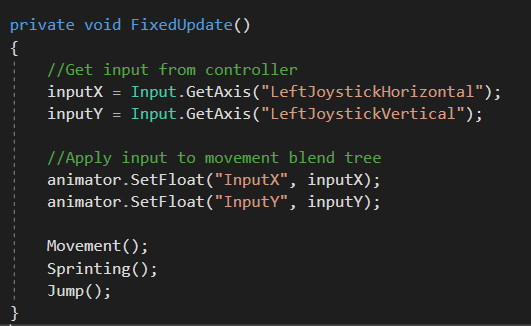
Also in FixedUpdate() I applied the player's input to a blend tree in the animator. This allows the character's animations to be updated continuously and smoothly dependant on the players input.
Within Movement() the inputX and inputY floats are applied to the character's CharacterContoller in order to make them move in the desired direction.

This sets the move variable to equal the total of the transform.X and Y multiplied by the player's input. This gives a complete vector which the CharacterController uses to move. Multiplying move by movementSpeed allows adjustments to how fast the character should move when input is applied.
To apply gravity to the character, a continuous force was applied to the Y vector of the CharacterController.

The next process I undertook was to implement a sprinting functionality to the character. This was a simple process, achieved by modifying the value of movementSpeed when the left joystick is pressed down. Additional checks for if the player is grounded are also carried out to ensure sprinting in mid air cannot occur.

The final implementation for the character's functionality was jumping. In order to achieve this, I applied an upwards force to the character, on the press of the A button, using jumpHeight, which is a predetermined height which the player can jump to. Then I made sure to apply gravity to this process so the character didn't continue floating upwards forever.

After that, my movement controller was completed.
I had numerous troubles with rotating and moving the player using the left joystick so I opted to handle all rotations in the future using the camera. This was a workaround I wasn't best pleased with but numerous iterations of a rotation functionality just never seemed to work as intended and felt worse to play with than the current implementation - so I decided to stick with it.
The overall process to develop these features, outside of the rotation issues, went very smoothly and taught me a lot about physics handling and programming a robust movement system.


Comments